Integrating psv with Your Editor
Unix Text editors, vim et al.
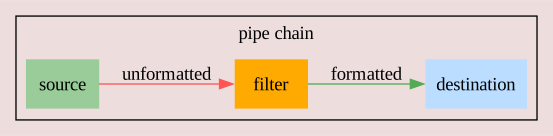
Typically, Unix pipes are described as a way to chain independent commands toegther, like so:
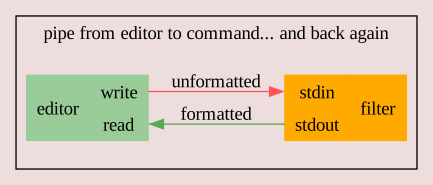
It seems to be less well known that Unix text editors have
always supported the idea of reformatting blocks of text by piping
the text to be reformatted through an external
program
, replacing the original text with whatever the external
program output
. i.e. the editor is the start and the end of a
circular pipe.
For vim, assuming that you are in normal mode (i.e. start by pressing Esc), the process is:
- start a shell command with the ! (exclamation mark) character
- use a movement command to specify how many lines should be re-formatted
- enter the name of the external program (e.g. psv)
- hit return
- select a range of text (lines) with a visual command (e.g. vip)
- type ! to enter a pipe command
- enter psv and hit return
Examples
| Keystrokes | Effect |
|---|---|
| !ippsv<Return> | refornat the block of text surrounding the cursor, bound by empty lines |
| vip!psv<Return> | visually select the current paragraph before reformatting |
| !{psv<Return> | reformat the rows between the cursor and the previous empty line |
| !}psv<Return> | reformat the rows between the cursor and the next empty line |
| !10jpsv<Return> | reformat the next 10 lines |
| !%psv<Return> | reformat all lines between the current line and the line containing the matching bracket |
| !/xyz<Return>psv<Return> | reformat all lines up to the next line containing xyz (search!) |
Vim Mapping Suggestions:
The two mappings below provide a way to reformat a table with just 2 keystrokes. Both macros do the same thing, the first in command mode and the second in visual mode.
Macro Process:
-
mzrecord the current cursor position in bufferz
-
!start a pipe to an external command -
ip(inner paragraph) select all of the text between the closest empty lines above, and below the current cursor position -
psvpipe
the selected text to psv and replace the selected text with psv's output -
`zfinally, restore the cursor position from thez
butter
I've chosen the combination Meta-aMeta-t, of course you can use any other mapping you prefer.
" ~/.vim/vimrc:

" vim mappings for aligning tables with psv
" Note: mz and `z are used to retain the cursor position, as much as possible
"
" Mnemonic: <a>lign <t>able
noremap  <M-a><M-t> mz!ippsv<return>`z
vnoremap <M-a><M-t> !psv<return>